
My items#
To get a quick overview of how many items related to you are still open, the “My items” widget is well suited. It clearly shows for how many items you are either the original author, the current responsible or the current manager.
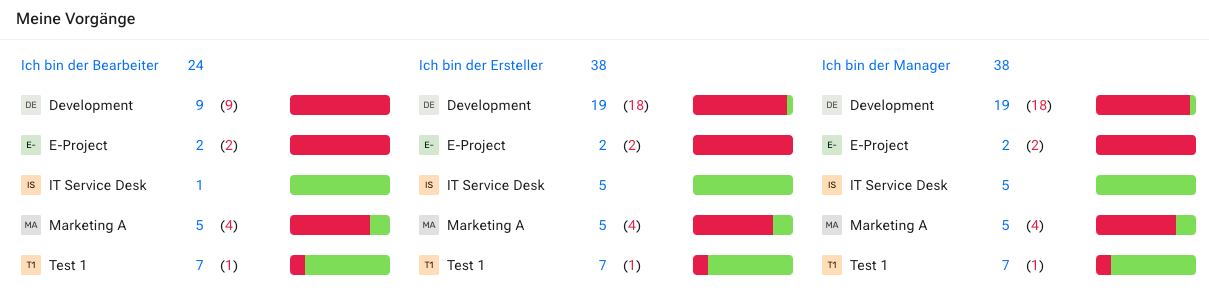
The “My items” widget requires no configuration. The panel looks as shown below. It has three columns:
Responsible: items for which you are currently responsible
My items: all items where you are either the author, responsible or manager
Manager: the items for which you are responsible as manager
Note
Only items that are not in the “closed” state are shown. To access the closed items, you must run a separate query, for example through the item overview.
There is also a number of rows containing figures with active links and a small bar chart. The top row is the total number of items for each category. You can click the respective number and you receive the complete list of items. This works for all numbers shown in this panel.
For each category, the numbers are broken down by each workspace they belong to. They are further divided into items that are on schedule (blue numbers) and overdue (red numbers). The charts give a quick overview of the percentage of overdue items relative to all items of this category and this workspace.