
Traffic light chart#
The traffic light chart gives a clear visual impression of a project’s status in terms of its on-time delivery, its effort and its quality. The criteria for red, yellow and green can be chosen freely.
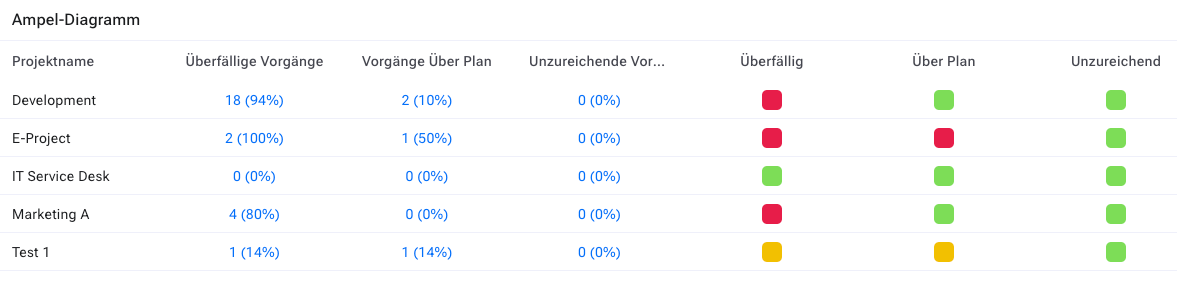
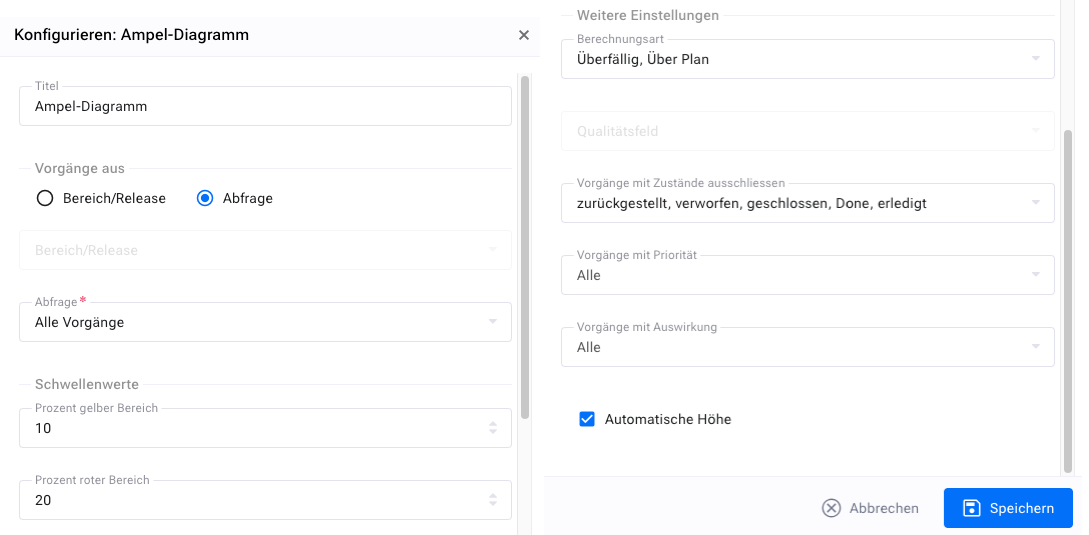
The traffic light chart widget offers the following configuration options:
A filter for which workspaces or items should be taken into account
A choice of which of the three categories “deadline”, “effort” and “quality” should be displayed as “overdue”, “over plan” and “insufficient” respectively
The past period that should still be taken into account. Items before that are no longer counted, as they are considered no longer relevant to the current project status
The percentage of problematic items above which the project is displayed as “yellow”
The percentage of problematic items above which the project is displayed as “red”
The statuses that mark an item as done
The attribute name for the “quality” criterion
The widget configuration looks as shown below.
To calculate the “deadline” criterion, items are marked as problematic if they are not done according to the configured statuses for “done” and their end date or target date has been exceeded. Items whose end date is later than the target date are also marked.
To calculate the “effort” criterion, items are marked as problematic if their projected effort, i.e. the sum of the effort already accrued plus the estimated remaining effort, exceeds the planned effort. Items whose planned effort exceeds the budgeted effort are also marked as problematic. To calculate the “quality” criterion, the items being considered must have a corresponding field configured on the “Edit” form. The attribute type “quality” must be of type “simple selection list” and allows you to mark items that have been flagged as done but do not have the desired result. Three values are possible (the names can be changed; the meaning depends on the order):
unknown
in order
insufficient
Items whose quality has been flagged as insufficient are marked as problematic.