
Item attribute configuration#
All item attributes share some properties — others are specific to the attribute type.
Attribute name#
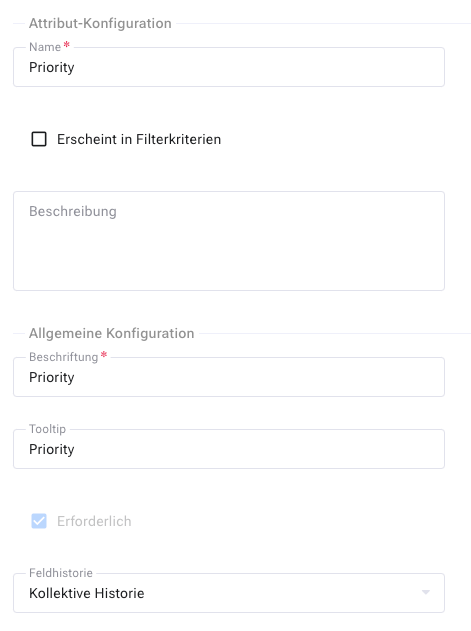
Every attribute carries a name. Allegra uses it in the full-text search index. If you change the name, the change always applies globally — including for derived or overridden attributes at the workspace, workspace type or item type level.
Common attribute properties#
You can change the name, but you should bear in mind that it may be referenced elsewhere in the system — for example in report templates.
Attribute type#
Every attribute has an attribute type such as “simple selection list” or “long text”. You can change the attribute type only to a limited extent — Allegra makes sure that no data is lost in the process.
Custom attributes do not appear in the user interface automatically. Place them explicitly on at least one input form so that users can see them.
Filter manager#
Attributes optionally appear in the filter manager. This is useful mainly for selection lists.
Invalid and required attributes#
You can mark attributes as invalid or required. Invalid attributes can no longer be added to the selection list when you manage input forms. They remain in the database but are no longer eligible for new forms.
If you mark an attribute as required, the user must enter a value when creating an item — otherwise Allegra displays an error message. The “required” flag only takes effect when creating items.
Attention
You can create problematic configurations that make it impossible to create new items. If you mark an attribute as required but it does not appear on the associated input form for that workspace and item type, no item can be created.
Label and tooltip#
Every item attribute has a label and a tooltip. The label appears in the user interface; the tooltip when you hover over it with the mouse. Both can be localized in the locale editor — and they are by default.
History#
For each attribute you decide whether Allegra stores the change history not at all, individually or together with other attributes. With collective history, later analyses over time are only very difficult to perform. For states, for example, a dedicated history is recommended.
You can also turn off an attribute’s history completely — for example for data protection reasons.