
Linking items#
sysman sysadmin
Items can be related hierarchically through parent-child relationships or freely related to one another through links.
A parent-child relationship implies that you can close parent items only when all child items are closed.
There can also be other kinds of item relationships. After installation, you can use the following link types:
An item may not be closed unless the linked item is closed. This is similar to the parent-child behavior but can be used outside a hierarchical relationship. It can be useful, for example, when components are used by a number of projects.
MS Project task dependencies offer the following sub-types:
Finish-start: the item starts when the previous item has finished
Finish-finish: the items must finish at the same time
Start-start: the items must start at the same time
Start-finish: the item finishes when the previous item starts
All of these relationships can be extended with a time lag, such as an item starting three days after the preceding item has finished.
The item is a duplicate of the related item.
The item is a test case for the related item, which could be a requirement or a feature request.
Link types#
Allegra lets you link items with different link types, such as “is a duplicate of” or “is test case for requirement”. This section explains how to create and manage your own link types.
You must be logged in as a system manager or system administrator.
Links let you connect items with one another. There are unidirectional and bidirectional links.
Allegra distinguishes between outgoing links and incoming links. An outgoing link points from the current item to the remote item. An incoming link points from the remote items to the current item.
For each link type and each link direction, you define a set of labels:
A label for the outgoing direction
A label for the outgoing direction
A label for the filter expression for the outgoing link direction
A label for the filter expression for the incoming link direction
Go to
Administration>Miscellaneous>Link types.
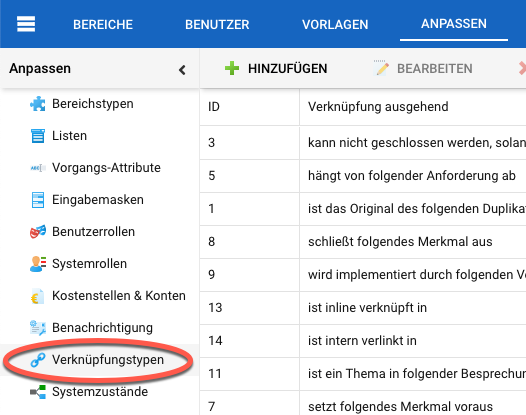
Managing link types#
To add a link type, click the “Add” button in the action menu. To edit a link type, select it in the right-hand table area and then use either the context menu or the toolbar button labeled
Edit.
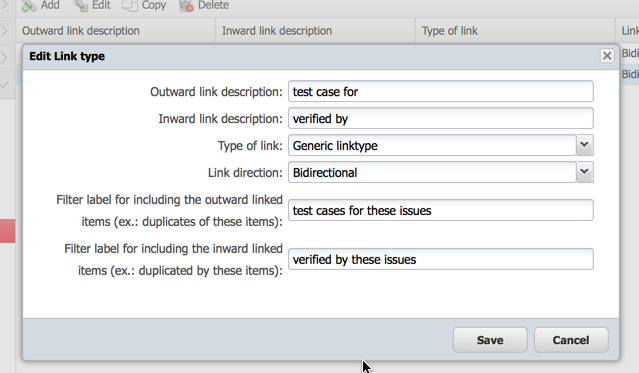
For more background on linking items, see Linking items.
Think of the filter expression labels as a completion of the expression:
“Include all items that …”
Example: “Include all items that …” are duplicates of these items.
The term “these items” refers to the items selected by the rest of the filter.
Save your link type.
You can now use your link type to connect items that would otherwise have no relationship or only a hierarchical relationship to one another.