
Standard attributes#
Items carry attributes — for example the item number or the item description. We distinguish between standard attributes and user-defined attributes.
The following table lists all standard attributes. These attributes are firmly anchored in the system and are often tied to special logic. You can change the label — but you should not change the attribute name itself.
Attribute name |
Id |
Description |
|---|---|---|
Project |
1 |
Workspace/project |
IssueType |
2 |
Item type |
Status |
4 |
State |
Manager |
5 |
RACI Accountable (manager) |
Responsible |
6 |
RACI Responsible (responsible) |
ReleaseNoticed |
8 |
Version in which a bug was found |
ReleaseScheduled |
9 |
Version with which the item is to be completed |
Priority |
10 |
Priority |
Severity |
11 |
Severity |
IssueNo |
12 |
unique number of the item |
Originator |
13 |
Author |
CreateDate |
14 |
Creation date |
LastModifiedDate |
15 |
Date of the last change |
SuperiorWorkItem |
16 |
Parent item |
Synopsis |
17 |
Title of the item |
Build |
18 |
Text field for software build numbers |
StartDate |
19 |
|
EndDate |
20 |
|
Description |
21 |
Description |
AccessLevel |
22 |
not used |
Comment |
23 |
Comment |
LastEditedBy |
24 |
last changed by |
ArchiveLevel |
25 |
“deleted” or “archived” |
SubmitterEmail |
26 |
|
WBS |
27 |
work breakdown structure code (WBS) |
ProjectSpecificIssueNo |
28 |
|
TargetStartDate |
29 |
desired start date |
TargetEndDate |
30 |
desired end date |
TaskIsMilestone |
32 |
marks the item as a milestone (obsolete) |
Duration |
33 |
|
TargetDuration |
34 |
desired duration |
Attachment |
for AQL search: restricts the search to attachments |
|
Link |
for AQL search: description of the link |
|
Expense |
for AQL search: all text properties in the expense entry |
|
BudgetPlan |
for AQL search: all text properties for budgets and planned values |
|
TemplateLink |
35 |
Link to the template |
VersionNumber |
37 |
Version number |
VersionName |
38 |
Version name |
PreviousVersionNumber |
39 |
previous version number |
FixedDate |
42 |
Fix date |
FixedTDDate |
43 |
Fix target date |
InternalComment |
44 |
Internal comment |
Private item (AccessLevel)#
Use this property to mark an item as “private” — only the author can then access it. Set the property to “invalid” to prevent the creation of private items.
ArchiveLevel#
Use this attribute to set an entry to “archived” or “deleted”. Allegra then hides it — unless you search for it explicitly.
Build#
A short text field, for example for the build number of a piece of software.
Created on (CreateDate)#
This attribute contains the unchangeable creation date of the item.
Description (Description)#
This attribute is a rich-text field for the description of the item. You insert tables, figures, code snippets and more.
Duration (Duration)#
This attribute contains the duration of an item — the time between start and end minus non-working time (holidays, weekends, the responsible’s time off).
When you create a new item, Allegra optionally sets a default value that you have it calculate using one of the following methods:
a fixed number of days
the average lead time of comparable earlier items
the average lead time plus waiting time of comparable earlier items
For the lead time, an attribute of type “lead time” must exist and appear on the editing forms. For the waiting time, you specify the state from which Allegra starts counting the waiting time.
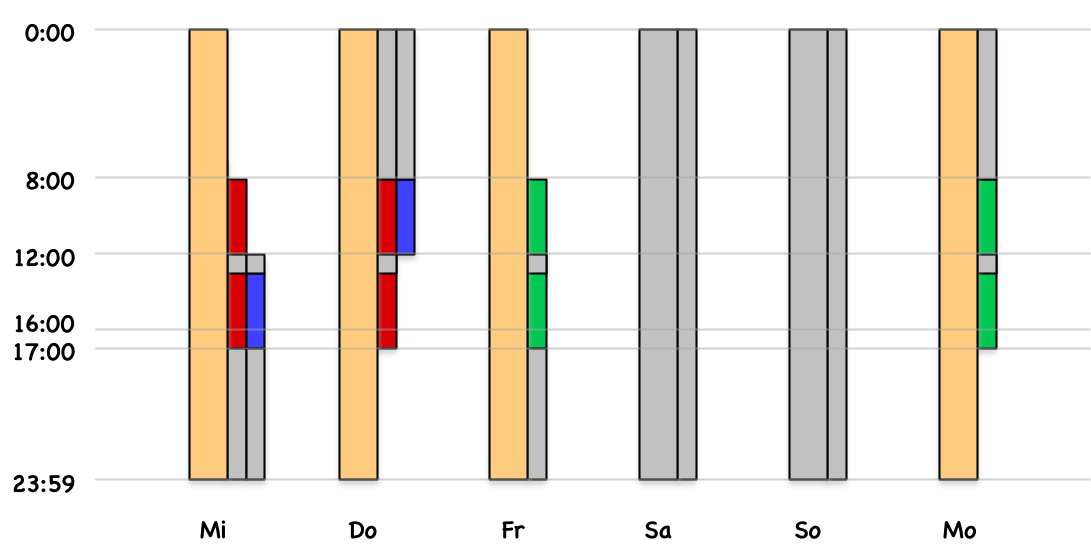
You define “comparable” via the same workspace, item type or responsible — or via combinations of these.
End (EndDate)#
This property contains the end date of the item.
Fix date (FixedDate)#
If this property is set, the start and end dates can no longer be moved in the Gantt chart. This protects milestones from being moved accidentally.
Fix target date (FixedTDDate)#
If this property is set, the desired start and desired end dates can no longer be moved in the Gantt chart.
Internal comment (InternalComment)#
Internal comments remain invisible to guest users. Otherwise they behave like normal comments.
Item number (IssueNo)#
Unique identification number of the item. It can be a sequential number or a workspace-specific prefix followed by a sequential number.
Item type (ItemType)#
The item type — for example Ticket, Task, Bug or Document.
Comment (Comment)#
The comment attribute differs from the others: here you only enter new comments. The list of all comments is managed separately by the system.