Configuring diagnostic messages#
sysman sysadmin
Allegra can be operated with many application servers, database systems and operating systems. In addition, Allegra can be configured in a variety of ways. If problems occur in such configurations, it is very helpful for the support team to receive diagnostic messages.
Normally, during regular operation, the number of diagnostic messages stored by the system should be minimal in order to achieve good performance and reduce space requirements.
However, it can sometimes be necessary to increase the number of diagnostic messages for certain modules in order to track down a problem. In this case, the “logging level” is increased for these modules. As a result, these modules write more messages to the log files.
Six logging levels are defined. The lowest logging level is “FATAL”, the highest “ALL”. The default configuration is to set all regular modules to the “WARN” level and the modules to be investigated to the “DEBUG” level.
Go to
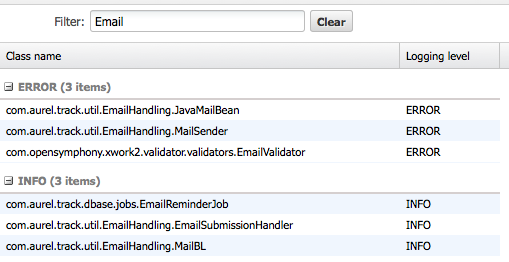
Administration>Server administration>Logging configuration. The screen that appears is a simple list of all Allegra modules.Enter a filter expression in the filter field to reduce the list. If you want to change a logging level for a particular module, find the row with the module name and change the level with the selection box behind the module name.