
Release states#
sysman sysadmin
Every release has a state that determines its visibility and defines what may happen to the items assigned to it.
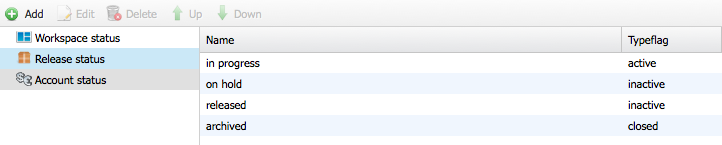
Allegra ships four release states. Each state carries a “type flag” that controls the availability of the release.
State name |
Description |
|---|---|
planned |
Appears only in the “Release scheduled” selection field. Such releases have usually not yet begun and are planned for the future. |
deferred |
Does not appear in the “Scheduled release” selection field, but in the “Detected in” field. Such releases are deferred — no new items arise. |
released |
Does not appear in the “Scheduled release” selection field, but in the “Released” field. Such releases are published — no new items arise. |
archived |
Appears neither in “Release scheduled” nor in “Release noticed”. Such releases have usually been published for a longer time and are no longer supported. |
The values and logic of the type flag are shown in the following table:
Type flag |
Description |
|---|---|
active (e.g. in development) |
Releases of type “active” are open to the full range of functionality. They appear in “Detected in” and in “Planned for” and are typically under active development. |
inactive (e.g. released) |
Releases of type “inactive” cannot be chosen in “Release scheduled”, but appear in “Detected in”. They are usually published — you no longer schedule any new items for them. |
planned |
Releases of type “planned” cannot be chosen in “Detected in”, but appear in the “Release scheduled” field. Such releases are planned for the future. |
closed |
Releases of type “closed” appear neither in “Release scheduled” nor in “Detected in”. Such releases have usually been published for a longer time and are no longer supported. |
Go to
Administration>Workspaces>Release states.Click
Addto create a new state. Select a state and clickEditto change it. ClickDeleteto remove it.
Warning
Changing the release state can make releases inaccessible.