
Project navigator#
The project navigator gives you a set of quick links to the information you need most often. For example, you can run reports, retrieve all items or only the recently added items, see how many items are in which state, or see which team member is assigned how many items. The project navigator automatically works for the respective project when used within a project cockpit, and it automatically works for the respective release when used within a release cockpit.
Presentation#
The project navigator requires no configuration when used within a project or release cockpit. When used in the general cockpit, it requires you to select a project and/or a release. In any case, you can select the reports you want to include as links from the list of all reports available in the system.
The panel looks as shown below.
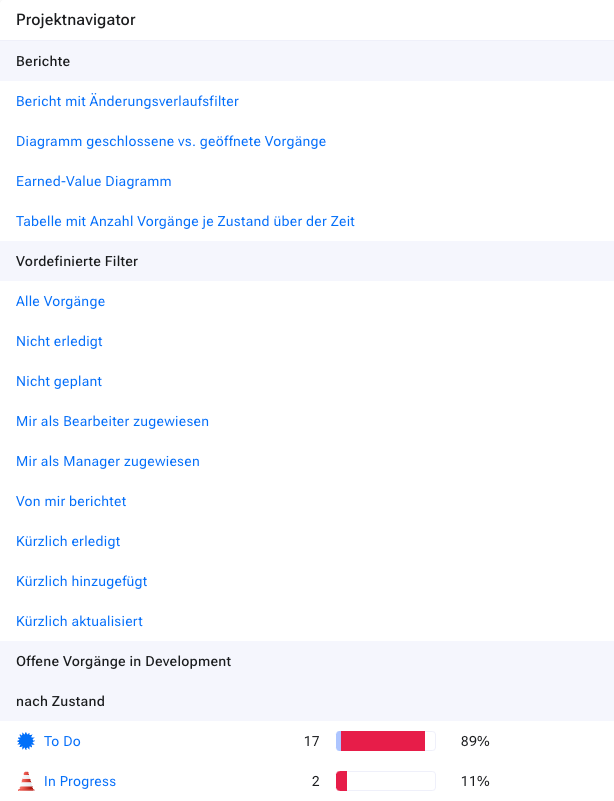
There are three areas:
Reports: These are links to reports you can run. The project and the release are configured automatically, but there may be other report parameters you must enter when you want to run the report.
Predefined filters: These are a set of commonly used filters. The result set is limited to items belonging to this project or release.
Open items: Here you get an overview of all open items in this project or release, grouped by state, priority and responsible.
Configuration#
When you use this widget in the general cockpit, you must specify for which project or release you want to activate the widget.
When you use the widget in a project or release cockpit, you do not need to configure anything.
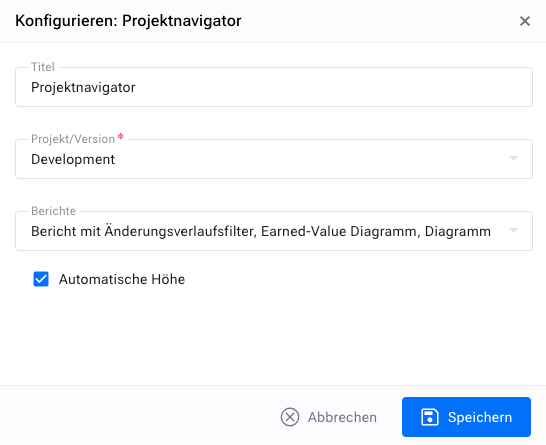
In any case, you can configure the reports you want to make available in the report area of the widget.