Item attribute types#
wsman sysman sysadmin
Items have attributes, standard attributes such as a title, an item number or the date on which they were last changed. Beyond that, it is possible to create your own item attributes.
This section describes the item attribute types that are available for creating your own custom attributes. Further types can be added via plug-ins without having to change the core software.
List of item attribute types#
No. |
Attribute type |
Short description |
|---|---|---|
1 |
Checkbox |
|
2 |
Cascaded selection list (P-C) |
|
3 |
Cascaded selection list (P-C-Grandchild) |
|
4 |
Simple selection list |
|
5 |
Multiple selection list |
|
6 |
Expandable selection list |
|
7 |
Expandable multiple selection list |
|
8 |
Radio group |
|
9 |
Date |
|
10 |
Floating-point number |
|
11 |
Integer |
|
12 |
Cumulative integer |
|
13 |
Short text |
|
14 |
Long text |
|
15 |
Rich text |
|
16 |
Person picker (general) |
|
17 |
Person picker (on behalf of) |
|
18 |
Workspace picker |
|
19 |
Item picker |
|
20 |
Rich text label |
|
21 |
Integer division |
|
22 |
Lead time |
|
23 |
Person meta field (text) |
|
24 |
Person meta field (list) |
Checkbox#
Checkbox attributes can be checked or unchecked. In the configuration you set the default value.
Cascaded selection list (parent-child)#
Cascaded selection lists of the parent-child type let you choose from a list of parent options. When a parent option is selected, the list of selectable child options changes. For example, the parent list could be a set of products, and the child list could be the components belonging to them.
Caution
You must already have defined a parent-child list before you begin defining an item attribute of this type. Otherwise you cannot complete the definition of the attribute.
In our example we have a short list of customers, Bosch and Siemens. The children are divisions of Bosch and Siemens. For Bosch we have the departments Gasoline and Diesel, for Siemens we have the divisions Energy and Telecom. All this information is contained in the list named “ParentChild”.
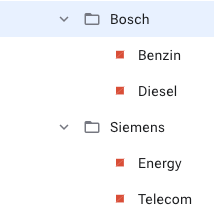
When placed on an input form, this selection looks as shown below.

When the selection in the left field is changed, the selection in the right field changes as well. Another example would be a selection for an operating system: Windows, Linux, Solaris on the left side and the version (98, ME, XP, Vista, Redhat, Debian, SuSE) on the right side.
Note
Even though the selection appears as two attributes, this will be a single attribute in the database. To search for this in AQL, you would search for “ParentChild: Bosch # Gasoline”. The attribute name is shown as part of the tooltip if your label differs from the attribute name.
Cascaded selection list (parent-children)#
Cascaded selection lists of the parent-children type link two lists of child options to a single entry in the parent item list. The first child has no dependency on the second child.
If, for example, the parent item list contained vehicle models, the first child list could contain the engine sizes available for that model, and the second child list could contain colors for that model. Different models can be offered with different engine sizes and colors.
Caution
You must already have defined a list of this type before you begin defining an item attribute of this type. Otherwise you cannot complete the definition of an attribute of this type.
In our example we have defined a generic Parent-Children list with three parents, Parent-1, Parent-2 and Parent-3. Each parent item has two lists with a number of child items linked to it. For example, Parent-1 has Child-1: 1, Child-1: 2 in its first child list and Child-1: L1, Child-1: L2, Child-1: L3 in its second child list. The names can of course be anything.
In the user interface this looks like below. When the parent selection is changed, the two child lists change.
Cascaded selection list (parent-children-grandchildren)#
A cascaded selection list of the parent-children-grandchildren type creates a hierarchy of dependencies. The child list is unique for each parent. The grandchild list is unique for each child. You can think of this as a tree with a depth of two.
If, for example, the parent item list contained car manufacturers, the child list could contain models for each vehicle manufacturer and the second list could contain engine sizes for each model of that manufacturer.
The engine size that could be selected depends on the specific model of that manufacturer.
Caution
You must already have defined a list of this type before you begin defining an item attribute of this type. Otherwise you cannot complete the definition of an attribute of this type.
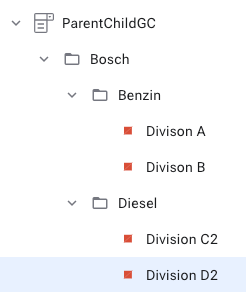
In our example we have defined a parent list with three producers Bosch, Siemens and AEG. For each parent we have defined three children. For each child we have defined a number of grandchildren.
When you change the parent selection, both the child and the grandchild selection change automatically. When you change the child selection, the grandchild selection changes automatically.
Simple selection list#
Simple selection lists allow the selection of one option from a list.
Caution
You must already have defined a simple list before you begin defining an attribute of this type. Otherwise you cannot complete the definition.
When you place this attribute on a form, it looks as shown below.

Multiple selection list#
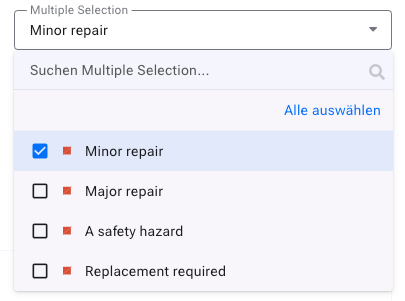
Multiple selection lists allow the selection of one or more options from a list. The default value is configured as part of the list, not as part of the attribute.
Caution
You must already have defined a simple list before you begin defining an item attribute of this type. Otherwise you cannot complete the definition of the attribute.
When you place this attribute on a form, it looks as shown below.

Expandable selection list#
The expandable simple selection lists allow the selection of a single entry from a list. You expand the list from the input form.
Caution
You must already have defined a simple list before you begin defining an item attribute of this type. Otherwise you cannot complete the definition.
Expandable multiple selection list#
The expandable multiple selection lists allow the selection of one or more entries from a list. You expand the list from the input form.
Caution
You must already have defined a simple list before you begin defining an item attribute of this type. Otherwise you cannot complete the definition.
Radio group#
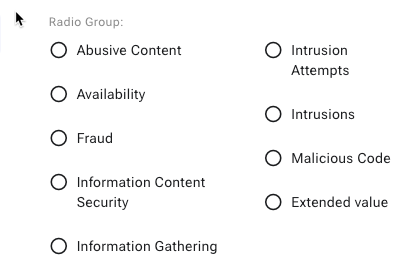
The radio group offers a selection from a list for marking one entry. The radio buttons can be arranged in a row or in an array. The options can be arranged horizontally row by row or vertically, that is, column by column.
Date#
Date attributes contain date specifications. In the user interface the date is formatted according to the user’s preferred format. Date attributes have a number of options.
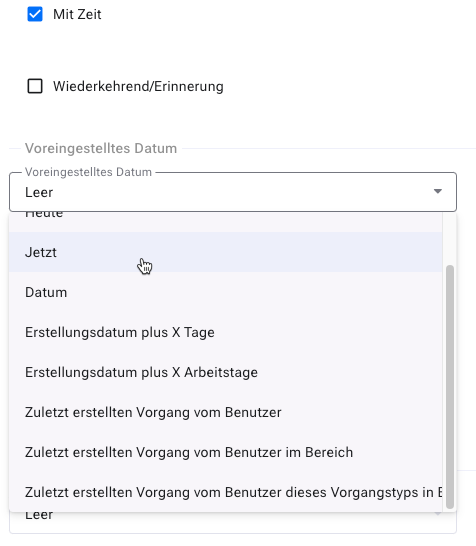
With time : Creates a date field with a time specification
Recurring/reminder : Allows you to enter regular appointments
Default date : With this you set the initial value of the attribute.
The field is empty
The field contains the current date at 0:00
The field contains the current date and the current time
The field contains a constant date
The field contains the current date plus X days or working days
The field contains the date of the user’s last item creation
Inherit hierarchically : The date is taken from items higher up in the hierarchy, if one is defined there. Otherwise the default date (see above) is used.
Validate date : You can set restrictions on the date values a user can enter.
The earliest/latest date is the current date at 0:00
The earliest/latest date is the current date and the current time
The earliest/latest date is a constant date
The earliest/latest date is the current date plus X days or working days
Floating-point numbers#
These attributes can hold positive and negative floating-point numbers.
You can define a default value and a minimum and maximum value. The minimum value must be smaller than the maximum value, if one is present. Furthermore, the default value must be greater than or equal to the minimum and less than or equal to the maximum value.
Integer#
Integer attributes can contain whole numbers, negative or positive.
You can define a default value and a minimum and maximum value. The minimum value must be smaller than the maximum value, if one is present. Furthermore, the default value must be greater than or equal to the minimum and less than or equal to the maximum value.
Cumulative integer#
Attributes of this type behave like regular integer attributes, except that they are summed up in an item hierarchy toward the root of the hierarchy tree. This means that this attribute is only editable at the lowest level of items.
Short text#
Short text attributes can contain a short, unformatted text (one line, up to 50 characters).
You can define a default text that is shown when creating an item, and you can set the minimum and maximum length of the item attribute.
Long text#
Long text attributes can contain longer descriptions, up to many thousands of characters. Long texts are displayed as a text area for convenient editing. The text, however, you do not format.

You can define a default text that is shown when creating an item, and you can set the minimum and maximum length of the item attribute.
Person picker (general)#
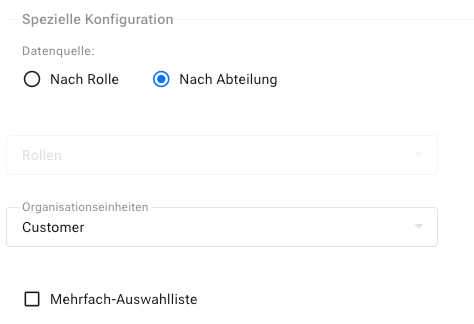
This attribute lets you select a user. The people available for selection can be determined based on roles or departments (organizations). It is also configurable according to which notification scheme they should be informed.
Person picker (on behalf of)#
This attribute is treated like the author of an item. For example, a technician can create an item for someone else, who is then treated as if they had submitted the item themselves.
Rich text label#
With a rich text label you can display rich text, for example a warning.
When you place this attribute on an input form, it looks as shown below.

Workspace picker#
The workspace picker lets you link another workspace to an item.
Item picker#
The item picker lets you link another item to the current item.
Integer divisions#
With this attribute you can form the quotient of the values of two lists. You can specify which list serves as the dividend and which as the divisor.
This attribute is useful, for example, when calculating a backlog priority, in the form: backlog priority = business values / story points.
Lead time#
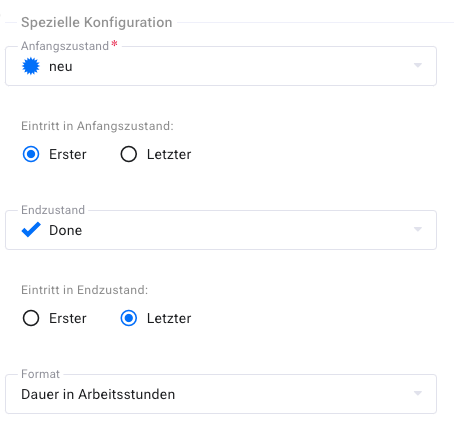
With this attribute you can measure the time between two state transitions. You can specify the states as well as determine whether the first or the last transition is used for the calculation.