
Project overview#
This widget gives you an overview of your projects and releases. You can configure which projects and releases you want to include. You can group the items by various aspects, for example by priority, item state, current responsible and so on. As with all other views, you can of course have multiple instances in your cockpit, for example one grouped by responsible and one grouped by state.
Configuration#
Before you can use this widget, you must configure it. Follow the general procedure for configuring a widget described above to reach the configuration page for the project summary, as described above.
You can change the widget’s description to give it a more precise meaning. This is especially helpful when you use more than one instance of this widget in your project, for example one grouped by state and one by responsible.
You can select which projects and/or versions you want to include in this widget. When you select a project, all versions of that project are included.
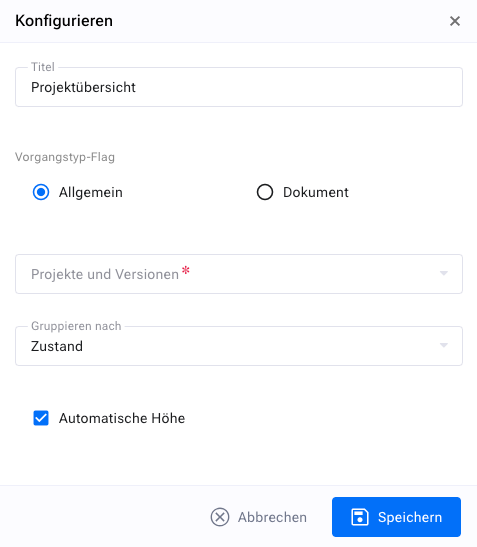
Finally, you must select the grouping criterion. You can group by:
Item type: This lets you see the distribution among different item types such as tasks, tickets, etc.
Item state: lets you monitor the project progress
Current manager: gives you an indication of the managers’ workload
Responsible: gives you an indication of your team’s workload
Priority: gives you an indication of the number of urgent items
Severity: gives you an indication of the number of critical items
Author: gives you an indication of who created how many items
Presentation#
The “Project overview” widget shows you the number of items, grouped by projects and/or releases, and a second grouping criterion that you chose for this widget.
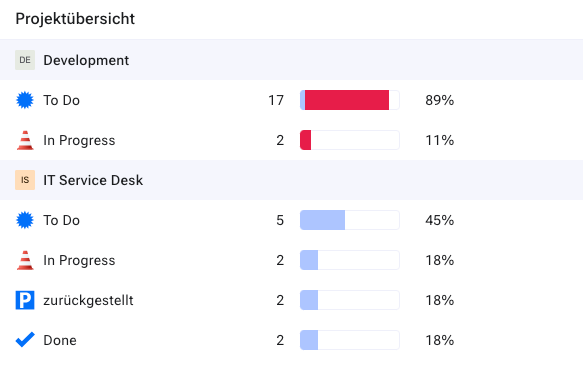
The number of items in each category is given as an absolute number, as a percentage of the total number of items for this group, and visualized as a bar chart.
Overdue items are marked red in the bar chart. You can click one of the category labels (for example a specific state in a specific version) to get the list of items for that category.