
Cost centers and accounts#
sysman sysadmin
Allegra lets you budget and track times and expenses for items. For this purpose, the system provides accounts and cost centers. All expenses are accumulated in accounts. Each account belongs to a cost center. Projects post their expenses to the accounts they are allowed to use.
You can create as many accounts as you like. Accounts can take on different states; for example, they can be open, so that authorized people can post their expenses to them, or they can be closed, so that it is no longer possible to post expenses to them.
An account can belong to one or more projects. For instance, there can be accounts for general tasks or overheads such as department meetings, vacation, sick leave, and so on.
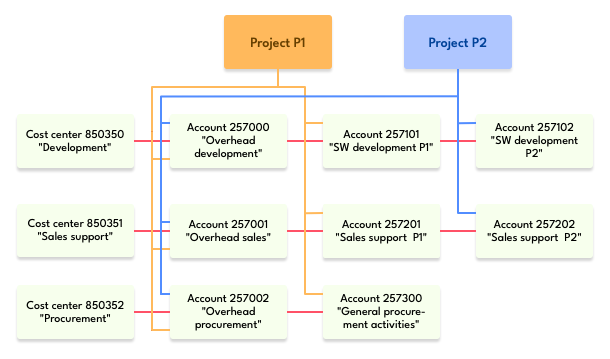
Cost centers and accounts#
Allegra is not an accounting system. However, it is easy to connect an ERP system such as SAP or Oracle with the information stored in Allegra. In this case, make sure that the account and cost center numbers in Allegra match those of the accounting system.
Accounting can be enabled separately for each project. So if a project manager does not need accounting and budgeting for their project, this function can be disabled.
Cost centers can be deleted; in this case their accounts are transferred to a replacement cost center.
Setting up accounting#
First, you have to create cost centers. Allegra associates only a little information with cost centers: a unique number, which should match the number in the accounting software, if any, and a name. Often the cost centers correspond to the departments.
The second step is to create accounts. Accounts have four properties:
A unique account number
A name
A cost center
A state
The account number should match the one used by the accounting system. The account name can be any string and should briefly describe the purpose of the account. Each account is assigned to exactly one cost center. The person responsible for the cost center is also the person responsible for the account.
Each account has a status. The status determines whether the account can be actively used or whether it is closed. If the account is closed, it no longer appears in the selection fields when users need to record their expenses.
Accounts can be deleted; however, their entire history must then be assigned to another, still existing account.
Accounts can accumulate material costs and work. Each project defines the base currency for the monetary material costs. There can be different base currencies for different projects. The base currency for the time spent is one working hour. Working days are mapped to working hours through the values in the project type definition, in the project definition, or in the definition of an individual user for the number of working hours.
The third step in setting up accounting for a project is to assign the previously defined accounts to the projects. It is possible to assign a single account to several projects. It is also possible to decouple accounts from projects.