
Filters and views#
Filters determine which items, out of the total set in the database, you actually see. All user-defined filters sit behind a system filter that enforces the access permissions imposed by the system.
Views determine how the filtered items appear — for example, as a flat list or as a Gantt chart (see Item browser views).
System filters and user filters#
A list of items is produced in two filter stages. In the first stage, the system filter ensures that you see only items for which you have permission. Items that others have marked as private — or that belong to a project you have no read permission for — therefore remain hidden from you.
In the second stage, Allegra passes the remaining items through your personal filter. You configure this freely, so that only the items you are currently interested in remain.
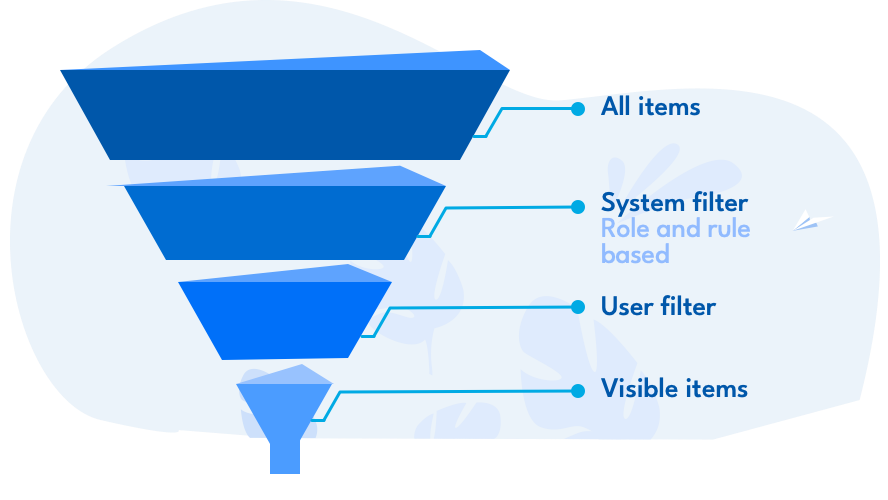
System filters and user filters#
You influence the system filter solely through roles in a workspace.
Personal filters, by contrast, you define in any number and save them for later use. Some cockpit widgets also provide filters, and there are predefined filters. In practice, you set up five to ten personal views that you work with most of the time. As a project manager, you make these filters available to your team — then everyone works with the same view.
Logical expressions#
A filter consists of two parts. You define the first part by selecting in the selection fields for the individual item attributes.
Example: Choose a workspace and the state “done” and deactivate all other criteria — you get all done items in this workspace. You narrow the list down with further criteria.
Formally: the individual criteria within an item attribute are combined with OR, the criteria of different attributes with AND.
The selection lists usually get you to the desired result already. You configure more complex filter expressions — including self-defined item attributes — in the lower part of the filter definition dialog.
Selecting all or nothing#
If you want to allow all values for a selection-list attribute, remove the attribute from the filter entirely. This way you also account for values added in the future. If future values should remain hidden, activate the selection field and mark all currently available values.
Parameters#
Normally, you define filters completely. You can also specify part of
the filter criteria only when applying the filter — to do so, use the
value $PARAMETER in the criteria.
Including linked items#
You include items that are linked to the filtered items — even if they do not meet the filter criteria. This lets you formulate queries such as:
filtered items and their not-yet-closed sub-items
filtered items and all their sub-items
filtered items and their predecessors