
Ctrl+K

Allegra User Manual

Getting Started

  • About this manual
  • The basic principle: items in workspaces
  • The first project
  • Structure of the user interface
  • Onboarding for project managers
  • Onboarding for team members
  • Modeling your own processes
  • Configuration basics

Managing Users

  • Users, groups, and organizational units
  • Managing your user profile
  • Managing regular users
  • Managing guest users
  • Managing groups
  • System roles & user interface
  • Workspace roles and permissions
    • Adding and editing roles
    • Deleting roles
    • Restricting access to item types
    • Restricting access to item attributes
  • Managing organizational units
  • LDAP configuration

Managing Workspaces

  • Managing workspaces
    • Creating a workspace from scratch
    • Creating a workspace by copying
    • Creating a workspace from a template
    • Assigning roles
    • Assigning accounts
    • Archiving a workspace
    • Deleting a workspace
  • Releases, sprints & backlogs
  • Workspace templates
  • Workspace types
  • Workspace type categories
  • Workspace states
  • Release states
  • Workspace-specific lists
  • Workspace-specific cockpits
  • Workspace-specific notifications

Working with Items

  • Items: what needs to be done
    • Items and workspaces
    • Item types
    • Creating an item
    • Creating an item from a template
    • Attachments
    • Efforts
    • Tab permissions
  • The item browser
    • Item browser left area
    • Item browser right area
    • General behavior in the right area
    • Item context actions
    • Editing a set of items
    • Copying a set of items
    • Linking items
    • Keyboard shortcuts
    • Split view of the right-hand area
    • Adjusting the column width
    • Moving columns
    • Sorting and grouping
    • Exporting to an XML file
    • Printing
    • Creating a template-based report
  • Filters and views
    • Finding items
    • Item browser views
    • Workspace filters
    • The Allegra Query Language (AQL)
    • Managing filters
  • Importing and exporting
    • Exporting to an Excel file
    • Importing items from Excel
    • Exporting in the Allegra format
    • Importing from Allegra installations
    • Exporting to a CSV file

Forms & Attributes

  • Managing item types
  • Standard attributes
  • Item attributes
    • Item attribute configuration
    • Item attribute types
    • Adding an item attribute
    • Overriding item attributes
    • Changing item attributes
    • Deleting item attributes
  • Forms
  • Managing item statuses
  • Managing priorities
  • Managing severities
  • Custom lists
    • Custom lists
    • Exporting custom lists
    • Importing custom lists
    • Import rules for lists

The Cockpit

  • Working with the cockpit
  • Changing the cockpit layout
  • Configuring widgets
  • Cockpit widgets
    • My items
    • My watch list
    • My filters
    • Quick search
    • Activity stream
    • Filtered item overview
    • Project overview
    • Project navigator
    • Manager list
    • Budget overview
    • Release notes
    • Calendar
    • Meetings
    • Version control activities
    • Traffic light chart
    • Average processing time
    • Milestone trend analysis
    • Status over time
    • Two-dimensional project statistics
  • Cockpit templates

Reports

  • Creating reports
  • Creating reports with MS Power BI
    • The Allegra Power BI connector
    • Data sources
  • Creating reports with JasperReports
  • Creating report templates
  • Accounting reports

Applications

  • Task management
    • Flat list
    • Tree view
    • Hierarchical view
    • Board
  • Project management
    • Project management terminology
    • Creating a new project
      • Creating a project completely from scratch
      • Creating a project by copying
      • Creating a project from a template
      • Registering team members
      • Assigning roles to team members
    • Project planning
      • Prerequisites for project planning
      • Work breakdown structure
      • Entering the work breakdown structure
      • Creating a schedule
      • Planning working time
      • Planning resources
      • The earned value method
      • Cost centers and accounts
      • Working with the Gantt chart
      • Working with the allocation view
    • Exchange with MS Project
      • Exporting a project to MS Project
      • Importing tasks from MS Project
      • MS Project import conflict resolution rules
  • Scrum
    • Scrum overview
    • Managing users
    • Managing Scrum teams
    • Managing Scrum projects
    • Managing releases
    • Working with backlogs
    • Working with sprints
    • Using the board
    • Monitoring a project with burndown charts
    • Scaled Agile Framework (SAFe)
      • Teams, programs, large solutions, and portfolios
      • Modeling dependencies
      • Overview and navigation
  • Customer portal
    • Customer portal overview
    • Example of a customer portal integration
    • Handling incoming emails
    • Conversations
    • Email filter scripts for the customer portal
    • Processing emails with JSON content
    • Email templates for the customer portal
    • Customer portal workflows
    • ITIL mapping
  • Wiki
    • Wiki overview
    • Creating documents
    • Creating document sections
    • Editing content
    • Multilingual documents
    • Embedding items
    • Embedding attributes
    • Reading and commenting on the wiki
    • Exporting documents
    • Version management
      • Versioning overview
      • Configuring versioning
      • Working with document versions
      • Working with branches
      • Working with baselines

Filters

  • Working with filters
  • Filter repositories
  • Configuring filters
  • Sharing filters

Workflows

  • Workflows

Notifications

  • Notifications
  • Item-related notifications
    • Notification triggers
    • Notification filters
    • Notification rules
    • Automail for unregistered authors
  • Reminders
  • System-related notifications
  • Notifications from workflows
  • E-mail templates

Templates

  • Managing templates
  • Freemarker context variables for item templates
  • Excel report templates
  • JasperReports report templates
    • Report template repositories
    • Loading a report template
    • Adding JasperReport templates
    • Uploading a report template
    • Removing report templates
  • Managing text templates
  • Email templates
  • Wiki inline templates
  • Wiki export templates
    • Creating HTML templates
    • Creating Word templates
  • Cockpit templates
  • Board card templates
  • Managing base calendars
  • Workspace templates

Miscellaneous

  • Cost centers and accounts
  • Account states
  • Linking items
  • Scripts
    • Workflow activity scripts
    • Workflow guard scripts
    • General scripts
    • Parameter scripts
  • Adding event handlers
  • Configuring versioning
  • Tutorial videos
  • Configuration files
  • SSL and TLS encryption

Email

  • Incoming email connection
  • Outgoing email connection
  • Cleaning up e-mail content
  • Filtering reply e-mails

Server Administration

  • Server status
  • Data backup
  • Restoring data
  • Broadcasting emails to Allegra users
  • Configuring diagnostic messages
  • Directories
  • Miscellaneous settings

Global Settings

  • Configuring the login page text
  • Configuring full-text search
  • Miscellaneous settings

Integrations

  • Managing integrations
  • Webhooks
  • GitLab CI/CD
  • MS Azure integration
  • MS Teams integration
  • OpenAI integration
  • Slack integration
  • Other applications

Customization & License

  • Translations
  • Logos and background image
  • License data

Indices

  • General Index
  • Configuring...

Configuring full-text search

Contents

  • Enabling/disabling full-text search
  • Enabling/disabling full-text search in attachments
  • Re-indexing at system startup
  • Selecting an analyzer
  • Index directory

Configuring full-text search#

sysman sysadmin

Allegra can search items and attachments for text. Supported formats include PDF, OpenOffice, Word, Excel, PowerPoint, HTML, RTF, and XML. To do this, full-text search must be configured.

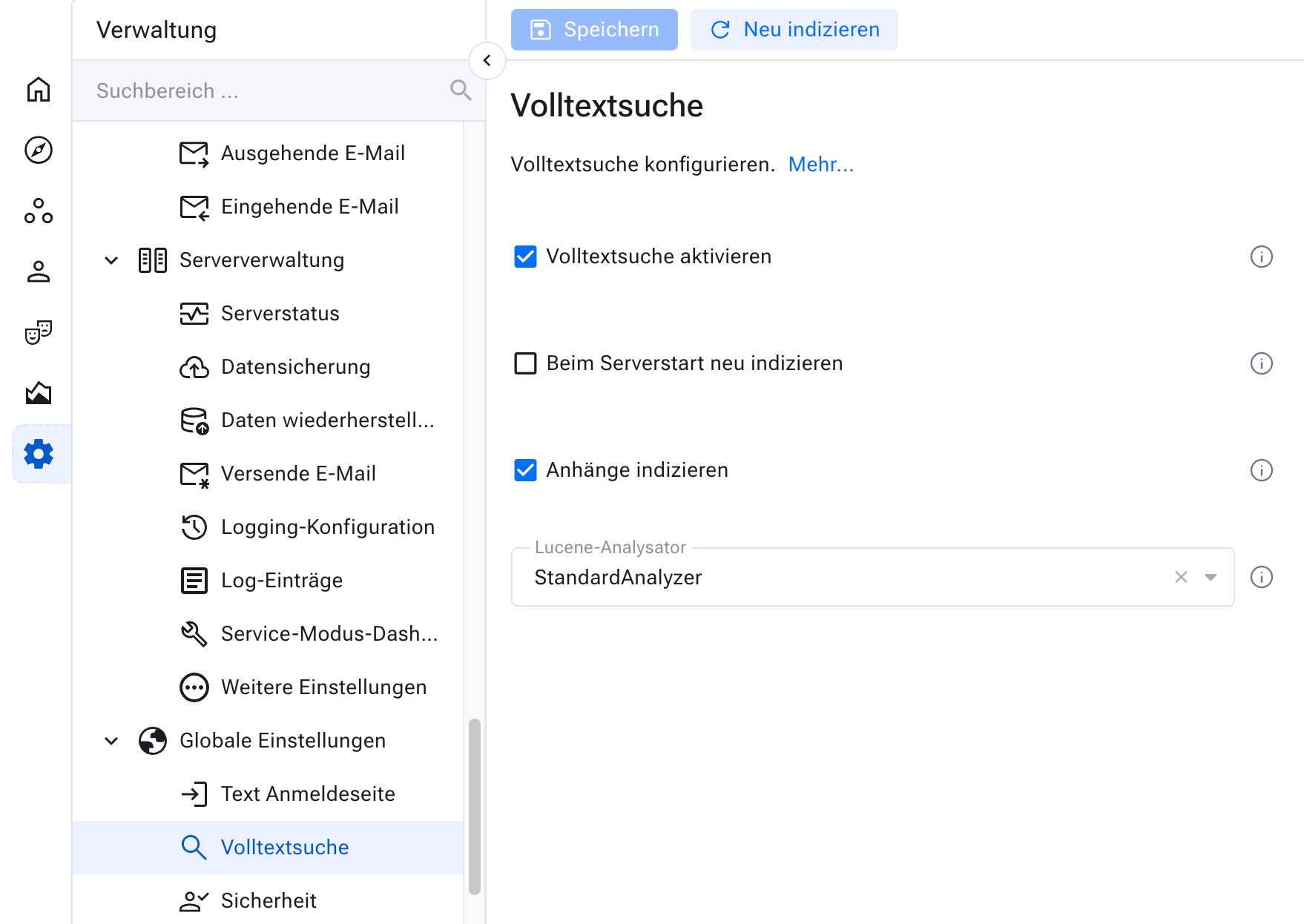
Go to Administration > Global settings > Full-text search to configure full-text search.
../_images/fullTextSearch.png

Enabling/disabling full-text search#

You can enable or disable full-text search. Note that full-text search requires storage space, especially when many or large attachments are indexed. The computational load can also be high, particularly when a complete rebuild of the index is forced at system startup.

Enabling/disabling full-text search in attachments#

You can enable or disable the indexing of attachments separately. Disabling it is useful when little storage space is available or when the server load should be reduced.

We recommend enabling the indexing of attachments.

Re-indexing at system startup#

When the checkbox for a complete rebuild is enabled, the index is rebuilt from scratch at system startup. Depending on the number of items and attachments, this can take a few minutes to several hours. During this time, full-text search is not available.

A complete rebuild of the index should not occur at every server startup. As a rule, rebuilding the index about every six months is sufficient. During the rebuild, access to the system should be disabled if possible.

Selecting an analyzer#

Allegra uses Lucene for full-text indexing and search. When building the index, it makes sense to ignore frequent words that are not normally searched for. In German, these include, for example, “ein”, “der”, “die”, “das”, “auch”, or “aber”. Such words should not be indexed.

Various analyzers are available for this purpose. They focus the indexing on the text components that are relevant to the search. Which analyzer is suitable depends on the language of the texts to be indexed.

Choose the analyzer that best fits your requirements. The standard analyzer is less efficient than a language-specific analyzer, but it works in all cases. If your texts and attachments contain multiple languages, the standard analyzer is usually the best choice.

Index directory#

By default, the directory for the full-text search index is created in $ALLEGRA_HOME/index. If attachments are included in full-text search, the space requirement can become considerable. You specify a different location for the index in the application.properties file:

allegra.index-path=abs-path

previous

Configuring the login page text

next

Miscellaneous settings

Contents
  • Enabling/disabling full-text search
  • Enabling/disabling full-text search in attachments
  • Re-indexing at system startup
  • Selecting an analyzer
  • Index directory

© Copyright 2026 Alltena GmbH.

Last updated on 2026-06-09.

Configuring the login page text
Miscellaneous settings
© Copyright 2026 Alltena GmbH .
Version 9.0